Using a Glossary
Written By Aira Mo
Last updated Over 1 year ago
1. Overview
Using a glossary in your translations ensures consistent terminology across all your content. This guide explains how to apply and manage glossaries during the translation process.
2. Applying a Glossary to Translation
Basic Usage:
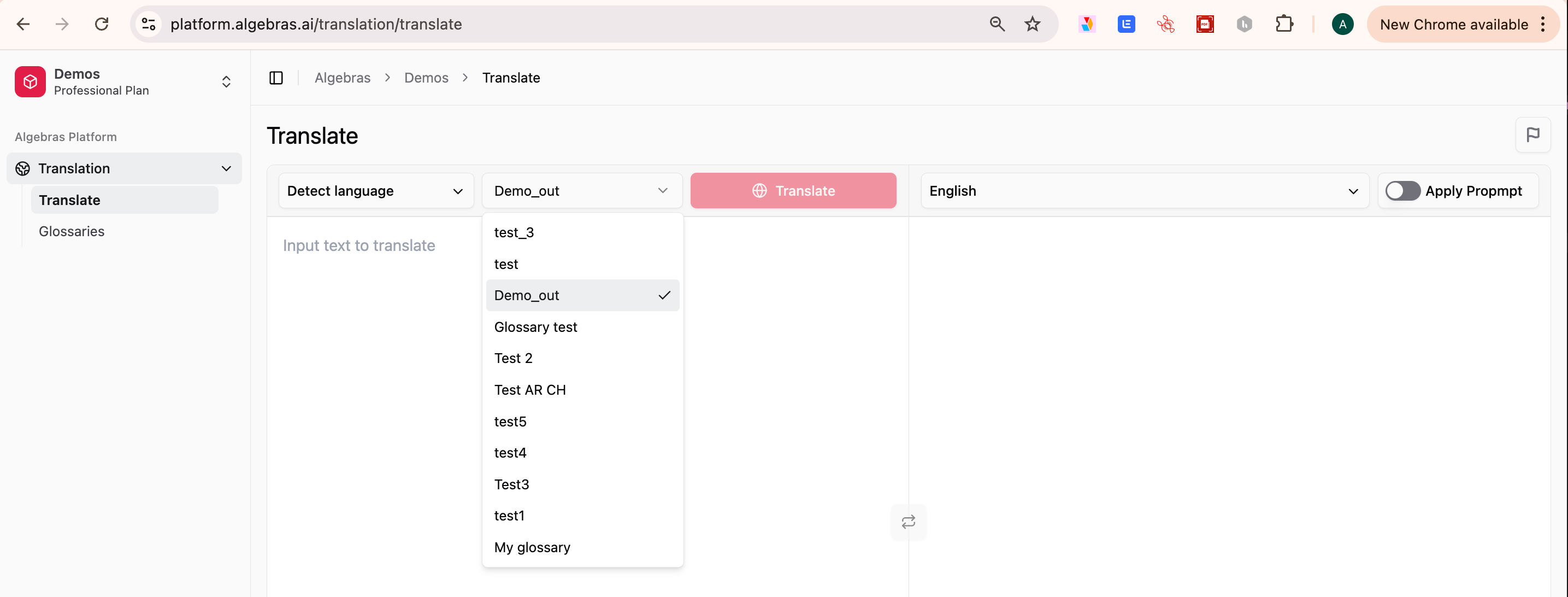
Go to the Translation tab.
Before translating, select a glossary from the dropdown menu.
The glossary ensures that selected terms remain consistent across languages.
Click Translate, and the output will respect the glossary rules.
Translation Tips:
Select the appropriate glossary for your content type.
Review glossary terms before translation.
Check for any missing terms.
Verify glossary application.
Best Practices:
Use domain-specific glossaries.
Keep glossaries up to date.
Review translations with glossary terms.
Test glossary effectiveness regularly.
3. Understanding Glossary Behavior
Term Translation Rules:
ON → Terms remain in the original language.
OFF → Terms are translated according to the glossary.
Not in Glossary → Terms are translated normally.
Context-aware translation follows glossary rules.
Handling Missing Terms:
If a term is not in the glossary, it is translated normally.
You can add it to the glossary for future use.
Review the translation for consistency.
Update the glossary if needed.
4. Advanced Features
Multiple Glossaries: You can use multiple glossaries for different purposes:
Technical documentation
Marketing content
Legal documents
Product-specific terms
Glossary Selection:
Choose based on content type.
Consider target audience.
Match industry standards.
Review glossary coverage.
Combining Glossaries:
Use primary and secondary glossaries.
Handle overlapping terms.
Manage term conflicts.
Maintain translation consistency.
5. Quality Assurance
Review Process:
Check glossary term usage.
Verify translation consistency.
Review context appropriateness.
Validate technical accuracy.
Common Issues:
Missing terms in translation.
Incorrect term usage.
Context mismatches.
Inconsistent translations.
6. Troubleshooting
Common Problems & Solutions:
Terms Not Being Applied
Check glossary selection.
Verify term status (ON/OFF).
Review term formatting.
Check for duplicates.
Inconsistent Translations
Review glossary rules.
Check term definitions.
Verify language settings.
Update glossary if needed.
Solutions:
Update glossary terms.
Adjust translation settings.
Review glossary rules.
Contact support if needed.
7. Next Steps
After using your glossary:
Update your glossary based on usage.
Review translation quality.
Share feedback with your team.
Plan regular glossary maintenance.
Start translating now
Still need help? Share an idea